Find Comparable Properties and Appeal Your Assessment — Free Tools Inside
Most Illinois homeowners have no idea whether their property assessment is accurate. They get the bill, they pay the bill, and they move on. The assessment could be off — and they would never know, because checking used to require digging through county records, downloading spreadsheets, and doing math that nobody outside a tax attorney's office has any reason to know how to do.
We built two tools to fix that. One is free. The other goes deeper.
The Free Tool: Property Tax Check
On every town's real estate page, there's now a search bar. Type your address or property identification number (PIN) and you get an instant verdict: over-assessed, fairly assessed, or not enough data yet.
Here's what happens when you search:
- Your assessed value — what the county says your property is worth, broken down into the assessor's market value and your equalized assessed value (EAV), which is what your tax bill is actually based on.
- A comparison — how your assessment stacks up against comparable properties nearby.
- An estimated savings figure — if you're over-assessed, how much you could save per year by appealing.
No login required. No credit card. Just search your address and see where you stand.
If the tool flags you as over-assessed, you can enter your name and email to get a free DIY Property Tax Appeal Guide as a downloadable PDF. It walks you through the full appeal process — Board of Review filing, deadlines, what evidence to bring, common mistakes — so you can handle it yourself without hiring an attorney.
Try it: Search your address on your town's real estate page.
The Paid Tool: Assessment Appeals Dashboard
The free check tells you whether to look closer. The paid tool gives you everything you need to build a case.
Parcel-Level Assessment Data
The Assessment Appeals Dashboard shows you every residential parcel in your municipality. You can sort and filter by over-assessment percentage, estimated savings, ZIP code, or township. If you're a tax professional working across a territory, this is your prospecting tool — you can see exactly which properties have the strongest appeal cases at a glance.
Assessment Hotspots
The dashboard identifies geographic clusters where over-assessment is concentrated. View hotspots by ZIP code, township, or community area to see where the assessor's model is systematically high. These patterns matter: if your entire neighborhood is over-assessed, that's a stronger argument than a single outlier.
Comparable Properties with Appeal Strength Scoring
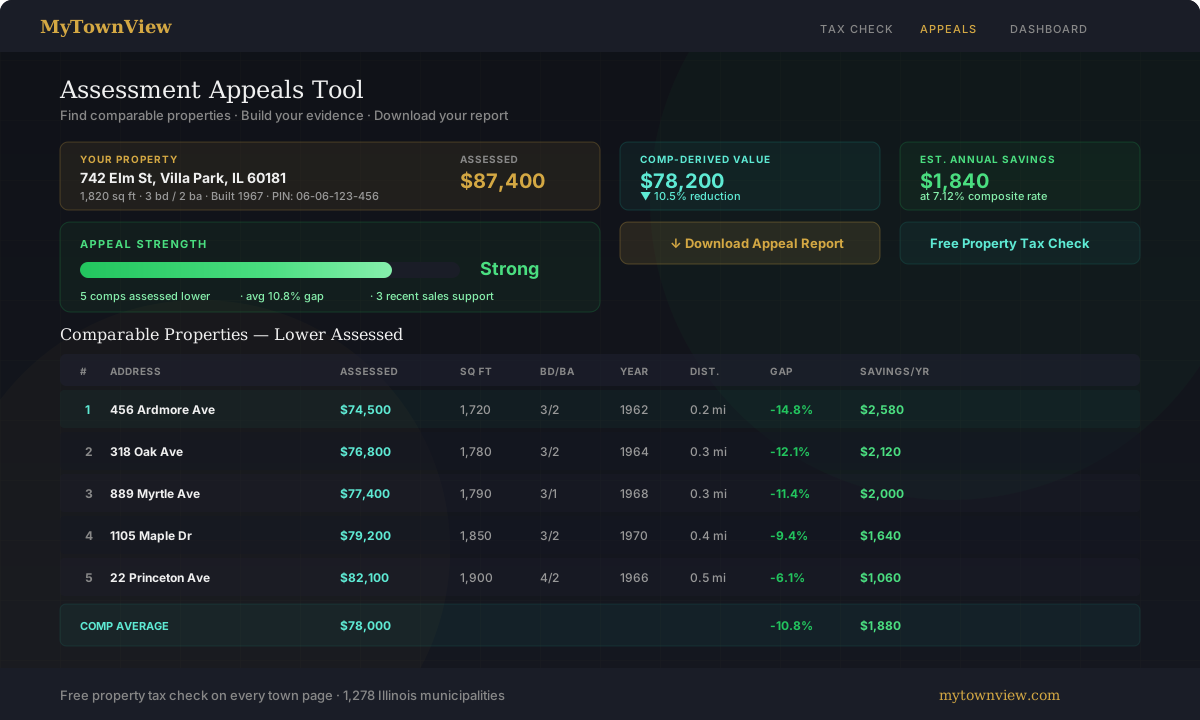
This is the core of the tool. Select any property and the system finds comparable homes — matched by the same criteria Illinois assessors use: location, size, age, design, and amenities — and shows you how their assessments compare to yours.
Then it gives you an appeal strength score: Strong (appeal recommended), Moderate (worth considering), Weak (marginal case), or Not recommended. A strong rating means you have multiple close comps with significant assessment gaps and recent sales data that supports a lower value. A weak rating means the evidence is thin — similar properties are assessed at roughly the same level, so an appeal is unlikely to succeed.
The score isn't a guarantee. But it automates the comparables research that would otherwise take hours of manual work, done instantly across every parcel we cover.
Market Sales Evidence
Beyond assessment comparisons, the tool surfaces recent residential sales within your area over the past three years. If similar homes sold for less than what your assessment implies your home is worth, that's a second line of evidence — and often the most persuasive one in front of a Board of Review.
The PDF Appeal Report
Once you've reviewed your comps and decided to move forward, you can download a multi-page appeal report as a PDF. It includes:
Page 1 — Your property details (address, PIN, square footage, beds/baths, year built), your current assessment, a summary narrative, and estimated savings.
Page 2 — A table of comparable properties assessed lower than yours, with their assessed values, the difference from yours, and the estimated annual tax impact of each.
Page 3 — Market sales evidence (if available): recent comparable sales, median sale price per square foot, and how the assessor''s value compares to what similar homes actually sold for.
Page 4 — Methodology: how comparables were selected and weighted (described below), data sources, and your county''s Board of Review filing information.
Before generating the report, you enter your name and contact information. The finished PDF is formatted to attach directly to a PTAX-230 petition — the standard Illinois assessment appeal form. Print it, staple your comps, and you're ready to file.
Two Scoring Systems, Two Lines of Evidence
Illinois boards of review accept two types of evidence when you appeal: comparable sales (what similar homes actually sold for) and assessment equity (what similar homes are assessed at). We run both analyses because they answer different questions, and the strongest appeals use both.
Both systems select and rank comparables using the same five criteria the Illinois Property Tax Appeal Board (PTAB) requires: location, size, age, design, and amenities. These are the standard factors PTAB uses to determine whether a property is truly comparable.
Market Sales Comps
These are similar homes that sold within the last three years in the same city. The similarity score is weighted by PTAB''s comparability criteria:
- Location — 30% (PTAB''s primary criterion: "same subdivision or neighborhood")
- Building square footage — 20% (size)
- Lot size — 15% (size)
- Year built — 15% (age)
- Sale recency — 10% (PTAB gives more weight to sales closer to the assessment date)
- Bedroom/bathroom match — 10% (amenities)
If comparable homes sold for less than what your assessment implies your home is worth, that''s your market value argument.
Assessor Comps (Equity/Uniformity)
These are parcels in your municipality with the same property class, scored by physical similarity to your property:
- Location — 30% (proximity within the municipality)
- Building square footage — 25% (size)
- Lot size — 20% (size)
- Year built — 15% (age)
- School district match — 10% (affects tax rates, so PTAB considers it relevant)
The key difference from market sales: we intentionally exclude assessed value from the similarity calculation. For an equity appeal, you want to find properties that are physically similar but assessed differently. Scoring by assessed value would defeat the purpose by preferring properties assessed at the same level as yours.
If similar properties are assessed lower than yours, that''s your uniformity argument — the assessment isn''t applied consistently.
Who This Is For
Homeowners doing their own appeals. The free check tells you if it's worth your time. The paid tool and PDF report give you the evidence package that would otherwise cost you hours of research or a contingency fee to a tax attorney.
Tax appeal attorneys and firms. The dashboard lets you identify properties with strong appeal cases across entire municipalities. Sort by estimated savings, filter by appeal strength, and build your pipeline.
Real estate agents advising clients. When a buyer asks about property taxes, you can show them exactly how the home's assessment compares to nearby properties — and whether there's room to appeal after closing.
Check Your Property — Free
The Property Tax Check is live on every town page across all 1,278 Illinois municipalities we cover. Search your address, see your verdict, and decide if it's worth digging deeper.
The Assessment Appeals Dashboard with full comparables, appeal strength scoring, and PDF report download is available to paid subscribers. See plans →