Your Town at a Glance: The New Customizable Dashboard
Every resident cares about different things. Your dashboard should reflect that.
Some people check crime stats every morning. Others track building permits. Municipal finance wonks want pension funded ratios front and center. Parents care about school data.
The old dashboard showed everyone the same thing. The new one lets you build your own.
20 Widgets, Your Layout
The Customizable Dashboard gives you a grid of widgets — small, focused cards that each display one slice of your town's data. Pick the ones you want, hide the ones you don't.
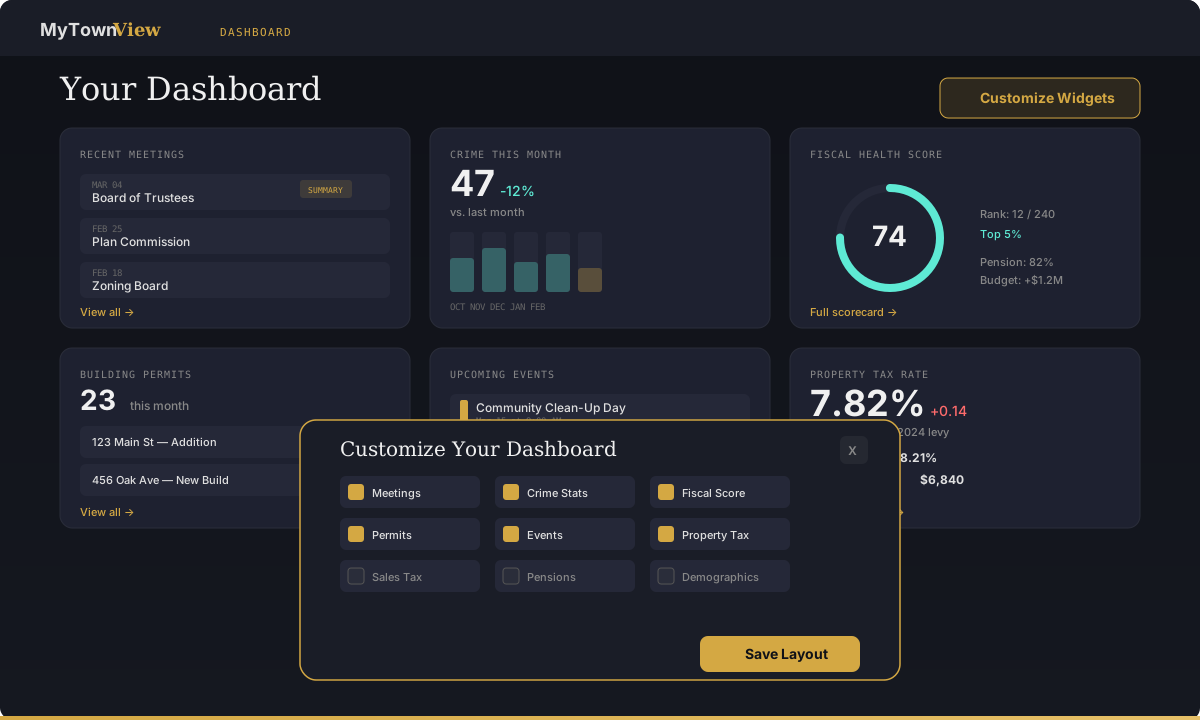
Available widgets include:
- Recent Meetings — Latest board meetings with summary badges
- Crime Snapshot — Monthly incident count with trend chart
- Fiscal Health Score — Composite score with peer rank
- Building Permits — Recent permits with addresses and values
- Upcoming Events — Community calendar at a glance
- Property Tax Rate — Current composite rate vs. county average
- Sales Tax Trend — Quarterly revenue with rolling comparison
- Pension Health — Funded ratios for police, fire, and IMRF
- School Performance — ELA/Math proficiency snapshots
- News Feed — Latest AI-generated articles from meetings
- Business Licenses — New filings and renewals
- Demographics — Population, income, and housing quick stats
- Budget Summary — Revenue vs. expenditure this fiscal year
- TIF Districts — Active districts with increment revenue
- Litigation — Open federal cases and recent filings
- Federal Spending — Grants and contracts flowing into town
- Alerts — Your most recent triggered alerts
- Saved Views — Quick links to your saved trend comparisons
- Quality of Life Score — Composite score with breakdown
- Coverage Map — Your town on the regional map
Drag, Drop, Done
Widgets snap to a responsive grid. Drag them to reorder. The layout adapts to your screen — three columns on desktop, two on tablet, one on mobile.
Your layout is saved automatically. Come back tomorrow and everything is exactly where you left it.
The Customize Modal
Click Customize Widgets to open a modal with every available widget listed as a checkbox. Toggle them on or off. The changes apply instantly — no page reload, no save button to forget.
Want to start fresh? A Reset to Default option brings back the standard layout.
Why It Matters
A dashboard that shows you everything shows you nothing. The best dashboard is the one that surfaces the five or six things you actually check. Now you can build exactly that.
Available on all paid plans.
Try it now. Open your Dashboard and click Customize Widgets in the top right.