Document Workspace: Upload, Analyze, and Organize Your Municipal Documents
Municipal government runs on documents. Budget proposals, grant applications, audit reports, vendor contracts, intergovernmental agreements, comprehensive plans, TIF reports, engineering studies. Every department generates them. Every board meeting references them. Every decision depends on them.
And in most towns, they're scattered everywhere. A budget draft lives in the finance director's email. The grant application is on someone's desktop. The audit report is in a shared drive folder that three people know about. When a new board member asks for background on a topic, someone spends twenty minutes hunting down the right file — if they can find it at all.
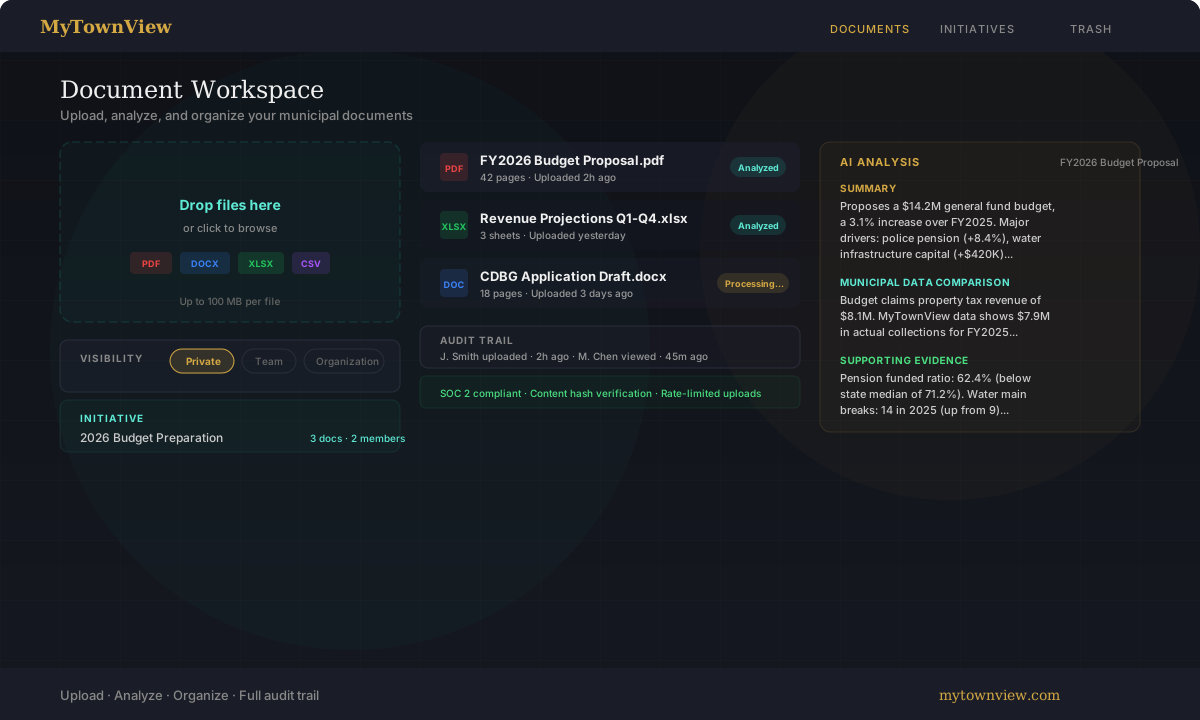
Document Workspace gives your team a single place to upload, organize, and analyze municipal documents, with AI-powered insights that connect what's in your files to what's in your town's data.
Upload Anything
Drag and drop files into the workspace or click to browse. Supported formats:
- PDF — budgets, reports, audits, agreements
- DOCX — draft documents, memos, policies
- XLSX — financial spreadsheets, projections, inventories
- CSV — data exports, contact lists, permit logs
- TXT — meeting notes, plain-text records
Files up to 100 MB each. Once uploaded, documents are automatically processed — text is extracted page by page (or sheet by sheet for spreadsheets) and indexed for analysis.
AI-Powered Analysis
Every processed document gets an AI analysis with three components:
Summary
A two-to-three paragraph overview of the document's key points. Not a generic abstract — the summary identifies specific numbers, proposals, and decisions. For a budget document, it'll tell you the total general fund amount, the biggest year-over-year changes, and which line items are driving the increase.
Municipal Data Comparison
This is where it gets interesting. The analysis cross-references claims and metrics in your document against actual data in MyTownView. If the budget proposal says property tax revenue will be $8.1 million but MyTownView's records show actual collections of $7.9 million last year, the analysis flags the discrepancy. If a grant application claims your town's poverty rate is 12%, the system checks that against census data.
It's not about catching lies — it's about catching stale numbers, optimistic projections, and data that needs updating before it goes to the board or a grant reviewer.
Supporting Evidence
The analysis identifies specific data points from MyTownView that are relevant to the document's subject matter. Reviewing a budget that proposes a police pension contribution increase? The analysis surfaces your pension fund's current funded ratio, how it compares to the state median, and the trajectory over the past five years. Looking at a water infrastructure capital plan? It pulls water main break counts and trends.
The goal is to give the reader context they'd otherwise have to go find themselves.
Three Visibility Levels
Every document has a visibility setting that controls who can see it:
Private — only you. Good for working drafts, personal notes, or documents you're reviewing before sharing. This is the default.
Team — visible to members of a specific team within your organization. Use this for department-level documents that don't need to be seen by everyone.
Organization — visible to everyone in your org. Use this for finalized reports, approved budgets, and reference documents that the whole team should be able to access.
Visibility can be changed at any time. Nothing is shared beyond your organization — documents are isolated between orgs, and cross-org access is not possible.
Initiatives
Documents don't exist in isolation. They're part of projects — a budget cycle, a grant application, a comprehensive plan update, a TIF district review. Initiatives let you group related documents and team members around a shared goal.
Create an initiative like "2026 Budget Preparation" or "CDBG Application — Round 12." Assign teams. Link documents. When a team member opens the initiative, they see everything in one place: the relevant documents, who's working on it, and the current status.
Initiatives support three statuses — active, completed, and archived — so you can track progress and clean up when a project wraps. Archived initiatives are still searchable if you need to reference them later.
Trash and Restore
Deleted documents aren't permanently gone. They move to the trash, where they're retained for 90 days before automatic permanent deletion. During that window, any org admin can restore a document — along with its analysis, visibility settings, and initiative links.
The trash view shows who deleted each document and when, so there's a clear record of what happened.
Full Audit Trail
Every action on every document is logged:
- Uploads — who uploaded, when, file size, content hash
- Views — who opened the document, when
- Downloads — who downloaded, when
- Analysis requests — who triggered analysis, when
- Deletions and restores — who deleted or restored, when
- Visibility changes — who changed visibility, from what to what, when
The audit trail is accessible to org admins and is designed to meet SOC 2 compliance requirements (CC6.1 for access control, CC7.2 for activity monitoring). Every upload is rate-limited (50 per hour per organization) and content-hashed (SHA-256) to prevent tampering and detect duplicate submissions.
Get Started
Document Workspace is available to organization accounts on the MyTownView dashboard. Upload your first document, see the analysis, and start organizing your team's work around initiatives.